Pacdora Discount Codes
Pacdora discount codes and offers on the online packaging design tool with 3D mockups, dielines and templates, plus advice on print-ready files.
codes Free to use
No sign upOffer details
Terms apply
No active voucher codes right now
There are currently no active voucher codes listed for Pacdora. Check back soon for new offers.
How to use a Pacdora discount code
Follow these simple steps to save on your next order.
- 1Find an offer
Choose a deal or code above.
- 2Copy the code
Click “Get code” and copy it to your clipboard.
- 3Shop at Pacdora
Add your items to your basket.
- 4Paste at checkout
Enter the code to see your discount applied.
About Pacdora
Pacdora is a browser-based packaging design tool: pick a box or container shape, set its dimensions, wrap your artwork round it, and get both a 3D preview and a print-ready dieline out of the other end.
Mockups and dielines are two different outputs
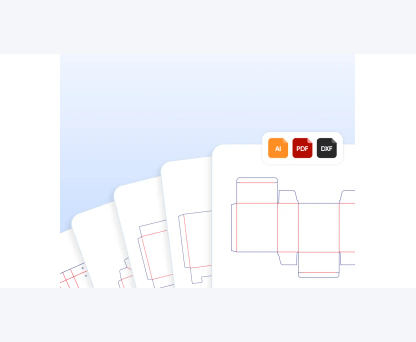
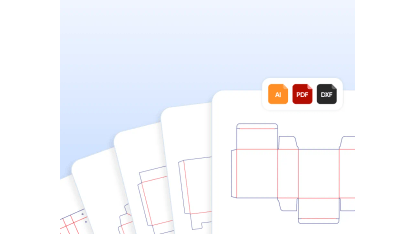
The mockup side turns flat artwork into a realistic render of the finished object, which is what you show a client or put on a product listing. The dieline side generates the flat cutting template — the outline, fold lines and glue tabs — scaled to the dimensions you set, which is what a printer actually needs. Most people arrive for the first and stay for the second. The library covers boxes, bottles, pouches, tubes, food packaging, bags and more, with templates to start from and an AI background generator for product shots.
Who it saves the most time for
It suits small brands and e-commerce sellers who need presentable packaging visuals without hiring a studio, designers who want to skip building a dieline from scratch, and anyone pitching an idea that does not exist yet. It runs in the browser, so there is no software to install and nothing tied to one machine. The trade-off is the usual one for a template-driven tool: it gets you to a good standard result quickly and does not replace a specialist for complex structural work.
Talk to your printer before you finish the file
This is the step that stops a design being reworked. Before committing, ask the printer that will produce the job for their specification: the material and thickness, the bleed they require, the colour profile they work in, and whether they have their own dieline they would rather you used. Print does not work in the colour space a screen does, so a design that glows on a monitor can land flat on board, and a spot colour is not the same thing as a mix of process inks. Send a proof and look at it under daylight, not desk light.
Dimensions, materials and what a render hides
Set the internal dimensions from the actual product plus clearance rather than from the outside of the box, and remember board thickness eats into it. A 3D preview will happily show a structure that is awkward to assemble, weak under stacking or impossible to fill on a line, so make a physical mock-up from the flat template before ordering a print run — one afternoon with a craft knife has saved a great many people a pallet of unusable boxes. Check what export formats and resolutions your plan includes before you pay for it.
Frequently asked questions
View all FAQsHow do I use a Pacdora discount code?
Choose an active offer, click “Get code”, copy it, and paste it into the discount-code field at checkout. Check the offer terms for eligibility.
Do Pacdora offers apply to sale items?
Eligibility varies by offer. Read the terms for the selected offer before you complete your order.
Does Pacdora offer free delivery?
Read the current delivery offer terms for qualifying orders, eligibility and delivery restrictions.
Can I use more than one discount code?
The retailer decides whether codes can be combined. Check the retailer’s terms at checkout.
More stores to explore
View all stores


Pacdora Discount CodesPacdora Discount Codes
Pacdora discount codes and offers on the online packaging design tool with 3D mockups, dielines and templates, plus advice on print-ready files.
No active voucher codes right now
There are currently no active voucher codes listed for Pacdora. Check back soon for new offers.
How to use a Pacdora discount code
Follow these simple steps to save on your next order.
- 1Find an offerChoose a deal or code above.
- 2Copy the codeClick “Get code” and copy it to your clipboard.
- 3Shop at PacdoraAdd your items to your basket.
- 4Paste at checkoutEnter the code to see your discount applied.
About Pacdora
Pacdora is a browser-based packaging design tool: pick a box or container shape, set its dimensions, wrap your artwork round it, and get both a 3D preview and a print-ready dieline out of the other end.
Mockups and dielines are two different outputs
The mockup side turns flat artwork into a realistic render of the finished object, which is what you show a client or put on a product listing. The dieline side generates the flat cutting template — the outline, fold lines and glue tabs — scaled to the dimensions you set, which is what a printer actually needs. Most people arrive for the first and stay for the second. The library covers boxes, bottles, pouches, tubes, food packaging, bags and more, with templates to start from and an AI background generator for product shots.
Who it saves the most time for
It suits small brands and e-commerce sellers who need presentable packaging visuals without hiring a studio, designers who want to skip building a dieline from scratch, and anyone pitching an idea that does not exist yet. It runs in the browser, so there is no software to install and nothing tied to one machine. The trade-off is the usual one for a template-driven tool: it gets you to a good standard result quickly and does not replace a specialist for complex structural work.
Talk to your printer before you finish the file
This is the step that stops a design being reworked. Before committing, ask the printer that will produce the job for their specification: the material and thickness, the bleed they require, the colour profile they work in, and whether they have their own dieline they would rather you used. Print does not work in the colour space a screen does, so a design that glows on a monitor can land flat on board, and a spot colour is not the same thing as a mix of process inks. Send a proof and look at it under daylight, not desk light.
Dimensions, materials and what a render hides
Set the internal dimensions from the actual product plus clearance rather than from the outside of the box, and remember board thickness eats into it. A 3D preview will happily show a structure that is awkward to assemble, weak under stacking or impossible to fill on a line, so make a physical mock-up from the flat template before ordering a print run — one afternoon with a craft knife has saved a great many people a pallet of unusable boxes. Check what export formats and resolutions your plan includes before you pay for it.
Frequently asked questions
How do I use a Pacdora discount code?
Choose an active offer, click “Get code”, copy it, and paste it into the discount-code field at checkout. Check the offer terms for eligibility.
Do these offers apply to sale items?
Eligibility varies by offer. Read the terms for the selected offer before you complete your order.
Can I use more than one discount code?
The retailer decides whether codes can be combined. Check the retailer’s terms at checkout.